
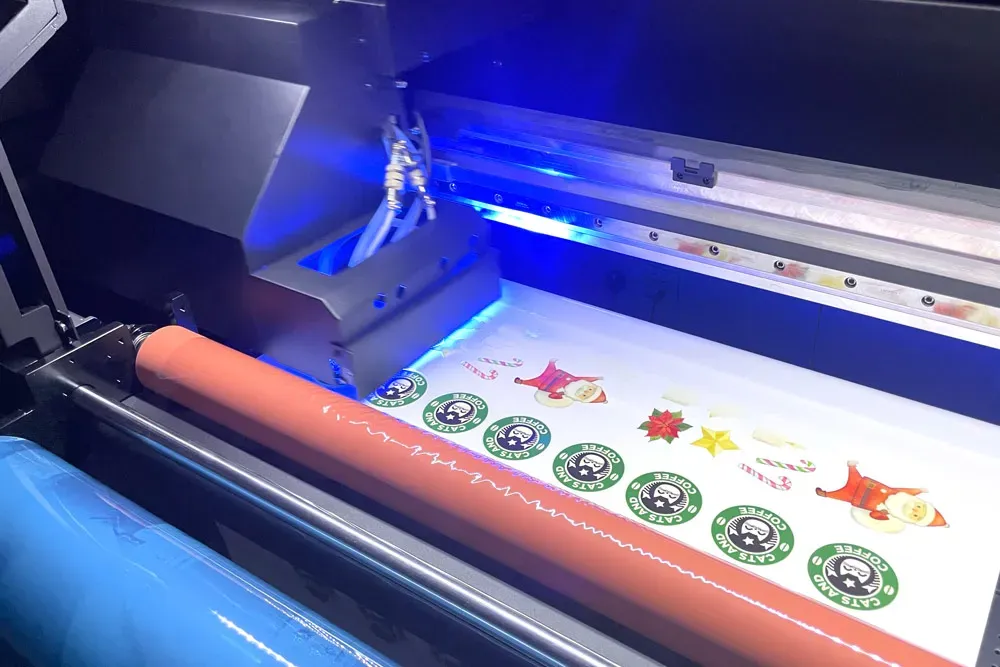
UV DTF printing is reshaping the landscape of custom apparel and product printing, allowing creators to produce stunning, long-lasting designs effortlessly. This innovative method stands out due to its versatility, enabling prints on a myriad of substrates, which is crucial for expanding business opportunities. To unlock the full potential of UV DTF printing, understanding essential techniques and best practices is vital, from UV DTF ink quality to DTF substrate preparation. In this article, we will explore invaluable tips that can dramatically enhance your UV DTF printing results, ensuring that each print not only meets but exceeds expectations. Mastering the finer points of DTF printer settings and application methods can set your work apart in this competitive market.
Referred to as Direct to Film UV printing, this cutting-edge approach offers a remarkable way to achieve high-definition prints that are both vibrant and durable. Utilizing advanced UV DTF technology, printers can create intricate designs on various materials, a feat that is becoming increasingly popular among businesses seeking to elevate their branding and merchandise. By focusing on key aspects like ink quality and substrate preparation, users can significantly improve their output quality and overall production efficiency. In this discussion, we will delve into critical insights and strategies that cater to both novice and experienced printers looking to refine their skills in this dynamic printing landscape. Embracing effective DTF printing techniques can pave the way for outstanding results and a flourishing creative endeavor.
Maximizing UV DTF Ink Quality
Achieving the best results in UV DTF printing greatly depends on the quality of UV DTF inks utilized. These inks not only play a crucial role in the vibrancy and longevity of your prints, but they also ensure that the colors appear true to your design specifications. Choosing high-quality inks from reputable manufacturers guarantees excellent coverage on a variety of substrates, which can vastly improve the overall print quality. Additionally, investing in UV DTF inks that are formulated for the specific characteristics of your DTF printer can prevent issues such as clogging and inconsistent print outcomes.
Furthermore, it’s essential to regularly assess the quality of your UV DTF inks during use. Inspect for proper viscosity and sedimentation, both of which can affect print quality if left unmonitored. Keeping track of the expiration dates and storage conditions of your inks is also critical. High-quality inks have an established shelf life which, if ignored, can lead to degradation in performance. Consistently maintaining a high standard for your ink quality can lead to a noticeable improvement in the clarity and durability of your final prints.
Best Practices for DTF Printing
When diving into the world of DTF printing, adhering to best practices can significantly elevate your output quality. A key best practice includes ensuring your substrate is compatible with your UV DTF printing process. Each material may respond differently to printing techniques, thus understanding the physical and chemical properties of your substrates can guide you in selecting the right approach. Regularly testing new substrates and documenting results will help in refining your practices and ensuring consistent quality.
In addition, fine-tuning your DTF printer settings is imperative. Always begin with the printer’s default settings and adjust as necessary based on the material and design intricacies. Factors such as print speed, ink flow, and temperature settings can have dramatic effects on print quality. Conducting experiments with various combinations can lead to discovering the optimal setting that achieves the best results for your unique applications.
DTF Substrate Preparation Techniques
The preparation of your DTF substrate is one of the most crucial steps in ensuring high-quality UV DTF prints. Properly preparing your materials involves several processes including cleaning, pre-treating, and conditioning the substrates. Always ensure that substrates are free from dust, oil, and moisture, as these contaminants can severely disrupt ink adhesion. Utilizing a lint-free cloth combined with mild cleaners can be effective in achieving pristine conditions for printing.
Moreover, pre-treating textiles or other print surfaces with appropriate agents can enhance the bonding of UV DTF inks. For instance, applying a suitable primer or coating can dramatically improve ink absorption and reduce fading. Also, understanding the specific requirements of the material – whether it be cotton, polyester or a synthetic blend – allows for using the correct pre-treatment method that further optimizes your printing results.
Fine-Tuning DTF Printer Settings
To achieve superior results with UV DTF printing, fine-tuning your DTF printer settings is essential. These settings dictate fundamental aspects of your print, from color accuracy to ink distribution. The dpi (dots per inch) is a critical variable; higher dpi settings lead to more detailed and vibrantly colored prints, making it crucial to balance quality with printer speed. Ensuring the correct balance between speed and quality helps in avoiding issues like blurred prints or undue ink discharge.
Additionally, adjusting the ink saturation settings according to the substrate type can lead to significantly improved results. Each substrate will absorb ink differently — understanding how much ink is required for materials such as dark fabrics versus lighter ones allows for custom adjustments that can elevate the final print quality. Regularly revisiting your printer settings after substantial print runs helps maintain quality.
The Importance of Post-Processing in UV DTF Printing
Post-processing is an often overlooked aspect of UV DTF printing that can vastly improve the quality and durability of printed designs. One of the most vital post-processing steps is curing the prints; utilizing UV light or heat to cure the ink solidifies the colors and enhances their resistance to scratches and fading. Following the manufacturer’s guidelines for curing times and methods ensures that the printed images achieve the best possible finish.
In addition to curing, heat pressing finished prints can further increase longevity and provide a professional touch. This process not only smooths out the surface of the print but also reinforces the bond between the ink and substrate, making it less likely to peel or crack over time. Regular post-processing inspections help in identifying and resolving any potential issues before they affect your final product.
Continuous Improvement through Testing and Experimentation
Continuous improvement is a cornerstone of successful UV DTF printing, and this begins with regular testing and experimentation. Conducting trials on different substrates and ink combinations allows you to gather valuable data that can drive quality enhancements. Documenting these experiments helps in creating a database of best practices, fostering a culture of learning and adaptation within your printing operation.
Moreover, obtaining feedback from production runs by reviewing printed samples against desired outcomes plays a critical role in refining your processes. Engaging in open discussions among team members and seeking input can also unveil new techniques or adjustments that may not have been initially considered. Emphasizing an ethos of continuous improvement can ultimately lead to superior print quality and operational efficiency.
Frequently Asked Questions
What are the best practices for UV DTF printing to achieve high-quality results?
To achieve high-quality results in UV DTF printing, follow these best practices: use high-quality UV DTF films, ensure your printer settings are optimized for DPI and ink profiling, pre-treat substrates for better ink adhesion, utilize multiple printing passes for color saturation, and maintain regular cleaning and maintenance of your printer.
How does UV DTF ink quality affect print outcomes?
UV DTF ink quality directly impacts the vibrancy and durability of your prints. High-quality inks ensure better adhesion, brightness, and resistance to fading, while inferior inks may result in poor print quality and premature wear.
What settings should I configure on my DTF printer for optimal UV DTF printing?
For optimal UV DTF printing, set your DTF printer to the highest available DPI for finer details, adjust ink profiles according to your substrate type, and regularly calibrate your printer to maintain consistent performance.
How should I prepare DTF substrates before UV DTF printing?
Preparing DTF substrates involves thoroughly cleaning the surface to remove any dust or oil, and applying a pre-coating agent if necessary to enhance ink adhesion. This foundational step is crucial for achieving strong and vibrant prints.
What are some tips for UV DTF printing on dark fabrics?
When UV DTF printing on dark fabrics, consider applying an underbase layer to improve color vibrancy. Using multiple passes can also help build up color saturation without over-saturating the film.
How important is post-processing in UV DTF printing?
Post-processing is critical in UV DTF printing, particularly the curing process. Proper UV curing hardens the ink quickly, increasing durability. Additionally, heat pressing the prints can enhance the finish and longevity of the designs.
| Tip | Description |
|---|---|
| Understanding the Focus Keyword | The focus keyword for SEO is ‘UV DTF printing.’ This sets the foundation for the article. |
| SEO-Friendly Related Keywords | Incorporate related keywords to enhance SEO: UV DTF printing tips, best practices, ink quality, printer settings, substrate preparation. |
| Quality Materials Matter | Use high-quality UV DTF films and inks for better adhesion and print quality. |
| Printer Settings are Vital | Set the DPI to the highest resolution and calibrate printer settings for each substrate. |
| Pre-Printing Process Essentials | Pre-treat fabrics/substrates and ensure they are clean before printing. |
| Effective Printing Technique | Consider using multiple passes and an underbase for better color vibrancy. |
| Post-Processing for Durability | Use UV curing and heat pressing to enhance durability and quality. |
| Regular Maintenance is Key | Regularly clean print heads/nozzles and monitor ink levels to maintain print quality. |
| Testing and Continuous Improvement | Regular testing on various substrates helps refine settings and improve quality. |
Summary
UV DTF printing is an innovative technique that allows for vibrant and long-lasting prints on various surfaces. By following the top tips provided, such as utilizing quality materials, fine-tuning printer settings, and ensuring cleanliness during the pre-printing phase, you can unlock the full potential of this method. Moreover, incorporating effective post-processing techniques like UV curing significantly bolsters the durability of your prints. Continuous testing and maintenance play vital roles in achieving consistent high-quality results. Embrace the world of UV DTF printing with these strategies, and watch your creations come to life!